You're probably feeling the same pressure most creators and lean marketing teams feel right now. One channel turned into four. One weekly video turned into daily posts, cutdowns, slideshows, hooks, captions, and rewrites for each platform. The hard part isn't only making more content. It's making more content without sounding like a machine that discovered trending audio yesterday.
That's where automated content creation starts to matter. Not as a shortcut for lazy publishing, but as a way to build a system. A real one. One that helps you spot ideas faster, draft faster, produce faster, and still keep a voice people recognize.
Introduction to Automated Content Creation Today
A faceless channel operator usually doesn't hit a wall because they run out of software. They hit a wall because the work multiplies. One winning idea needs a script, a visual structure, a voiceover, subtitles, platform variations, scheduling, and some way to learn what worked. Then the next day starts again.
That cycle is why automated content creation moved from “nice to have” into operating infrastructure. The market reflects that shift. The global market for AI-powered content creation was estimated at USD 2,150.79 million in 2024 and is projected to reach USD 10,593.0 million by 2033, with a projected 19.4% CAGR from 2025 to 2033 according to Grand View Research's AI-powered content creation market report. That matters because tools don't reach that scale unless creators, brands, agencies, and commerce teams are building them into everyday workflows.
What changes when content becomes a system
When teams work manually, each post is a fresh start. Someone opens a blank doc, stares at the feed, tries to find an angle, writes a script, edits clips, exports variations, and posts when they remember.
Automation changes that pattern.
- Ideas become inputs: Trends, comments, winning hooks, product angles, and competitor formats feed the system.
- Drafting becomes repeatable: Scripts, captions, and scene structures can start from templates instead of empty pages.
- Publishing becomes scheduled: Content moves through a queue instead of depending on memory and last-minute energy.
If you track trend movement often, tools that surface patterns early can help. A practical place to watch how formats evolve is social video trend tracking.
Automated content creation works best when you treat it like operations, not magic.
Where people get this wrong
A lot of people assume automation means “press button, get viral post.” That's usually where quality drops. The software can reduce repetitive labor, but it can't decide which angle fits your audience, which claim needs checking, or which line sounds like your brand instead of everyone else using the same prompt.
The useful question isn't whether AI can make more content. It can. The useful question is whether your workflow helps you make better decisions upstream so the output stays sharp, specific, and believable.
What Automated Content Creation Really Means
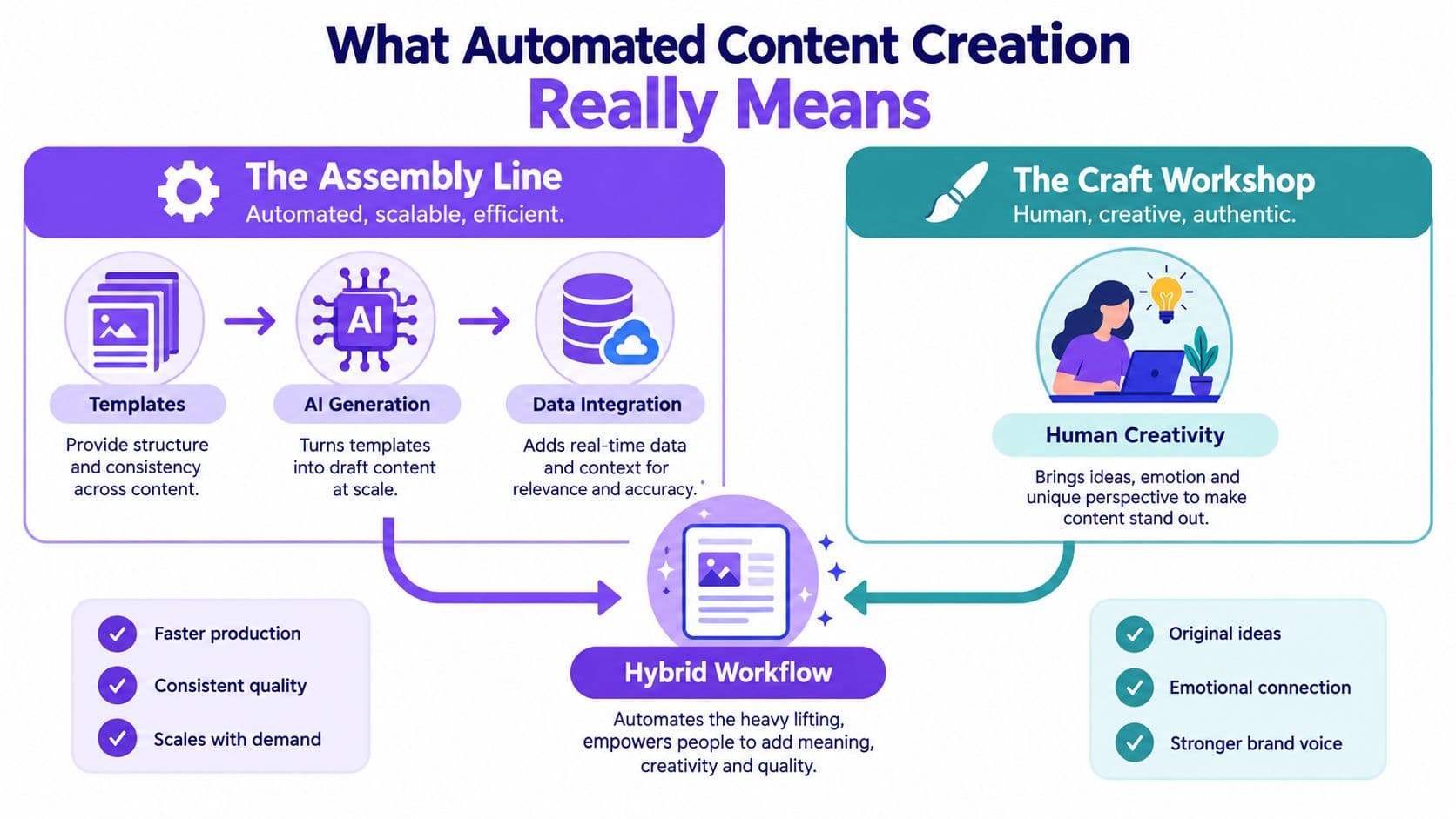
Think of two ways to make furniture.
In a craft workshop, one person measures, cuts, sands, assembles, and finishes each piece by hand. The result can be excellent, but it takes time and depends heavily on one person's energy and skill that day.
In an assembly line, the work gets broken into repeatable stages. Templates, tools, and checks keep the output moving. It's faster, more consistent, and easier to scale.
Automated content creation is a hybrid of those two models. It borrows the repeatability of an assembly line, but it still needs the taste and judgment of a craft workshop.
The parts software can handle well
Automation is strong at repetitive, structured tasks. That includes turning a concept into several draft hooks, expanding an outline into a script, converting a long video into short clips, generating subtitle variations, localizing copy, or moving approved assets into a scheduler.
If your team also needs to coordinate posting across channels, this guide on how to manage multiple social networks with Donivo is useful because it frames distribution as a workflow problem, not only a publishing problem.
The parts humans still need to own
AI text generation is not the same thing as automated content creation.
A text model can draft. A true automated workflow includes:
- inputs
- templates
- review rules
- asset assembly
- approvals
- scheduling
- feedback loops
Quality also needs a way to be judged. Automated content systems are commonly evaluated using metrics like relevance, coherence, terminology correctness, originality, and user engagement, and retrieval-augmented systems often use benchmark suites such as RAGBench and MIRAGE-Bench in automated content generation evaluation. In practice, that means a “good” output is not just fluent. It also needs to stay on-topic, use the right language for the niche, and remain faithful to the source material you gave it.
A simple way to explain it to a teammate
Use this distinction:
| Workflow type | What it does | Where it fails |
|---|---|---|
| Basic AI generation | Produces text, images, or drafts from a prompt | Drifts in voice, facts, and structure |
| Automated content workflow | Connects research, drafting, editing, approval, and publishing | Still needs taste and review |
| Human-led craft only | Delivers strong originality and nuance | Slows down under multi-channel demand |
The machine handles repeatable labor. The human protects meaning, taste, and trust.
Once you see that split, the category makes more sense. You're not replacing creativity. You're reducing the amount of manual assembly wrapped around it.
How Automated Content Workflows Work Step by Step
Most broken content systems don't fail at the output stage. They fail earlier. The team picks weak ideas, uses vague prompts, loses brand voice halfway through production, or publishes without a review checkpoint.
A solid automated workflow looks more like a connected pipeline than a single tool.
Step one through step three
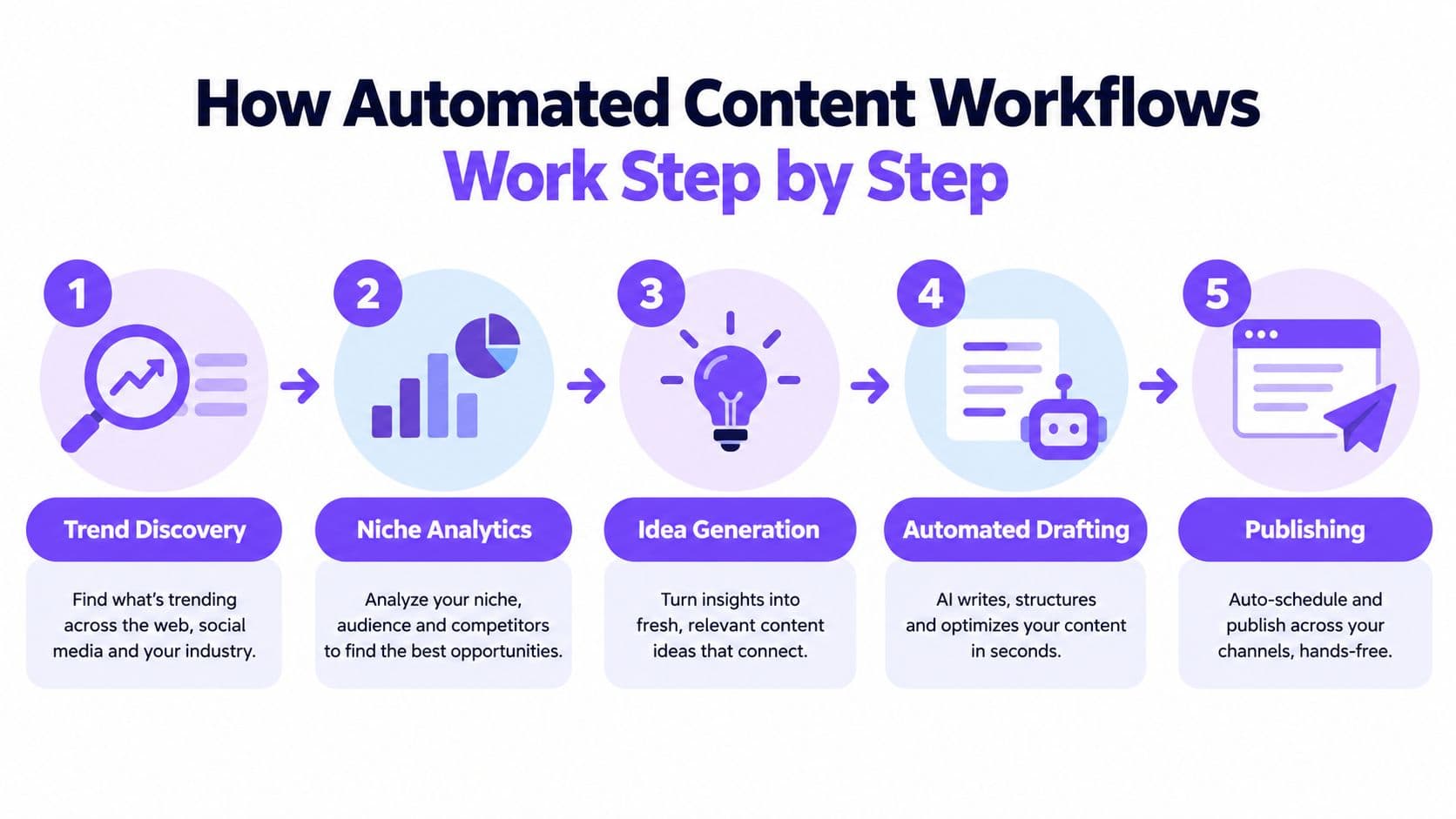
Start with discovery, not drafting. First collect raw material: trend patterns, customer questions, comment themes, competitor formats, product objections, and top-performing hooks from your own channel.
Then narrow that input into usable angles.
- Trend discoveryYou're not looking for “what's popular” in general. You're looking for formats your audience already understands. A hook style, a pacing style, a visual pattern, or a pain-point framing.
- Niche analyticsYou filter trends through your audience. A fitness creator, a DTC skincare brand, and a SaaS founder can all borrow the same format while saying completely different things.
- Idea selectionPick the angle before you generate the script. “Teach,” “compare,” “react,” and “debunk” create very different outputs even when the topic is the same.
Step four and step five
Once the angle is clear, automation becomes more useful.
- Drafting and assemblyGenerate script options, scene beats, captions, and visual instructions. Then attach assets: B-roll, product visuals, voiceover, avatars, or slides. In prompt-to-video research, generated videos reached an average prompt-to-visual relevance score of 89.4% in this IJERT prompt-to-video generation study. The practical takeaway is simple. Good outputs depend less on “AI magic” and more on clear prompts, structured assets, and selecting the strongest version.
Before you automate publishing, it helps to map where approved videos go next. A scheduling layer such as multi-platform content scheduling turns that handoff into a repeatable step instead of a manual scramble.
- Publishing and reviewSchedule the content, then track what happens. Not only views. Watch retention, saves, replies, click behavior, and where people drop off in the first seconds.
Here's the workflow in motion:
The guardrails that stop drift
Automation gets sloppy when teams skip structure. The fix isn't “use less AI.” The fix is to give the system better rails.
- Use a style guide: Include banned phrases, preferred wording, pacing rules, and examples of what sounds on-brand.
- Feed source material: Product facts, offer details, customer language, and proof points should be supplied before generation.
- Add review checkpoints: Check script claims, visual fit, pronunciation, and whether the opening line earns attention.
If the prompt is vague, the output will be generic. If the input is specific, the review gets faster.
The reason this matters is simple. Content automation is only as reliable as the decisions you make before clicking generate.
Benefits and Risks You Should Weigh Before Scaling
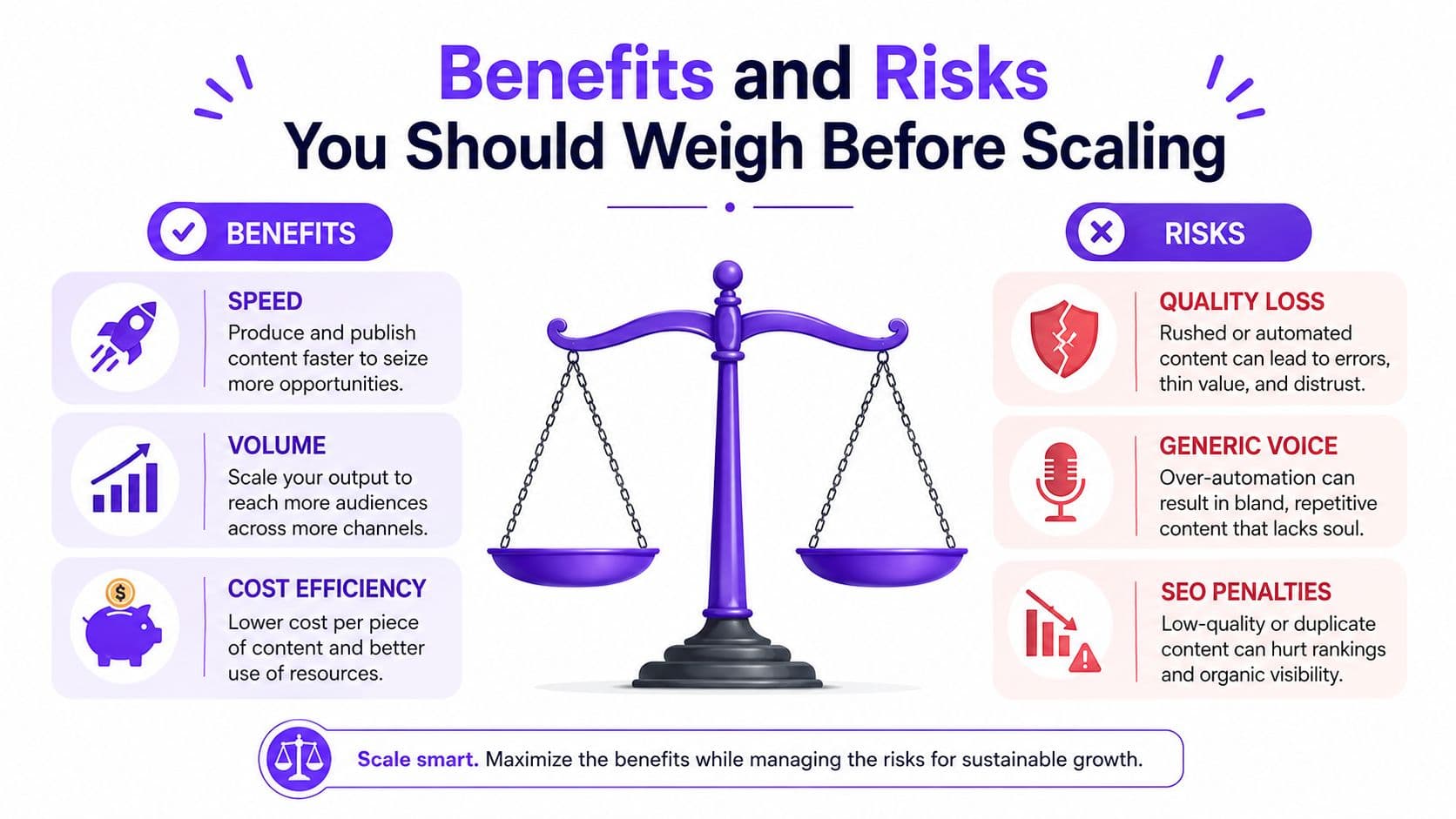
Automation can absolutely make a content team faster. It can also flood your pipeline with polished mediocrity if you scale before you know what your voice is.
That trade-off is why this category needs a sober look, not a hype list.
What you gain
Adoption is no longer niche behavior. Adobe's 2025 Creators' Toolkit survey found that 86% of creators were already actively using creative generative AI, based on responses from more than 16,000 creators across multiple countries, as summarized in these AI content creation adoption statistics. That kind of usage tells you the workflow value is real.
The gains usually show up in a few places:
- More throughput: Teams can draft and version content without starting from zero each time.
- Lower friction: Scripting, edits, subtitles, and repurposing take less manual effort.
- Better consistency: Templates and structured prompts reduce random swings in format and pacing.
- Easier localization: Once a format works, adapting it across markets becomes more manageable.
What can go wrong
The biggest risk isn't that the content looks AI-generated. The bigger risk is that it feels emotionally vacant. Audiences notice that faster than teams expect.
A 2026 consumer survey reported that nearly 83% of consumers had watched a video they suspected was AI-generated, and the biggest giveaways were robotic gestures at 67%, unnatural voices at 55%, and lack of emotional tone at 51%, according to this Demand Gen Report piece on AI video authenticity. That's the authenticity penalty in plain language. If viewers can spot the seams, trust drops.
A practical decision filter
Use this quick comparison before scaling:
| If your main problem is... | Automation likely helps with... | Human judgment should stay on... |
|---|---|---|
| Slow production | Drafting, assembly, repurposing, scheduling | Angle selection and final edit |
| Inconsistent posting | Queues, calendars, auto-publishing | Platform fit and timing context |
| Weak ideas | Brainstorming prompts and research support | Choosing what deserves to ship |
Don't automate because the tools exist. Automate the parts that are repetitive, rules-based, and easy to review. Keep people close to the parts that shape trust.
Best Practices to Keep Quality and Voice Human
The strongest automated systems don't treat AI like a replacement writer. They treat it like a junior producer with infinite stamina and inconsistent taste. That means the operator's job is to give direction, narrow choices, and reject weak drafts quickly.
The most useful shift is upstream. In a 2026 creator-economy survey, creators said AI was most valuable for writing and brainstorming at 82.7% each, followed by research and summarization at 72.8%, and the report framed AI as a “thinking partner” rather than a replacement for creator voice in this AI creator economy report from Kit. That's the frame worth keeping. The best use is often before the content exists, not after.
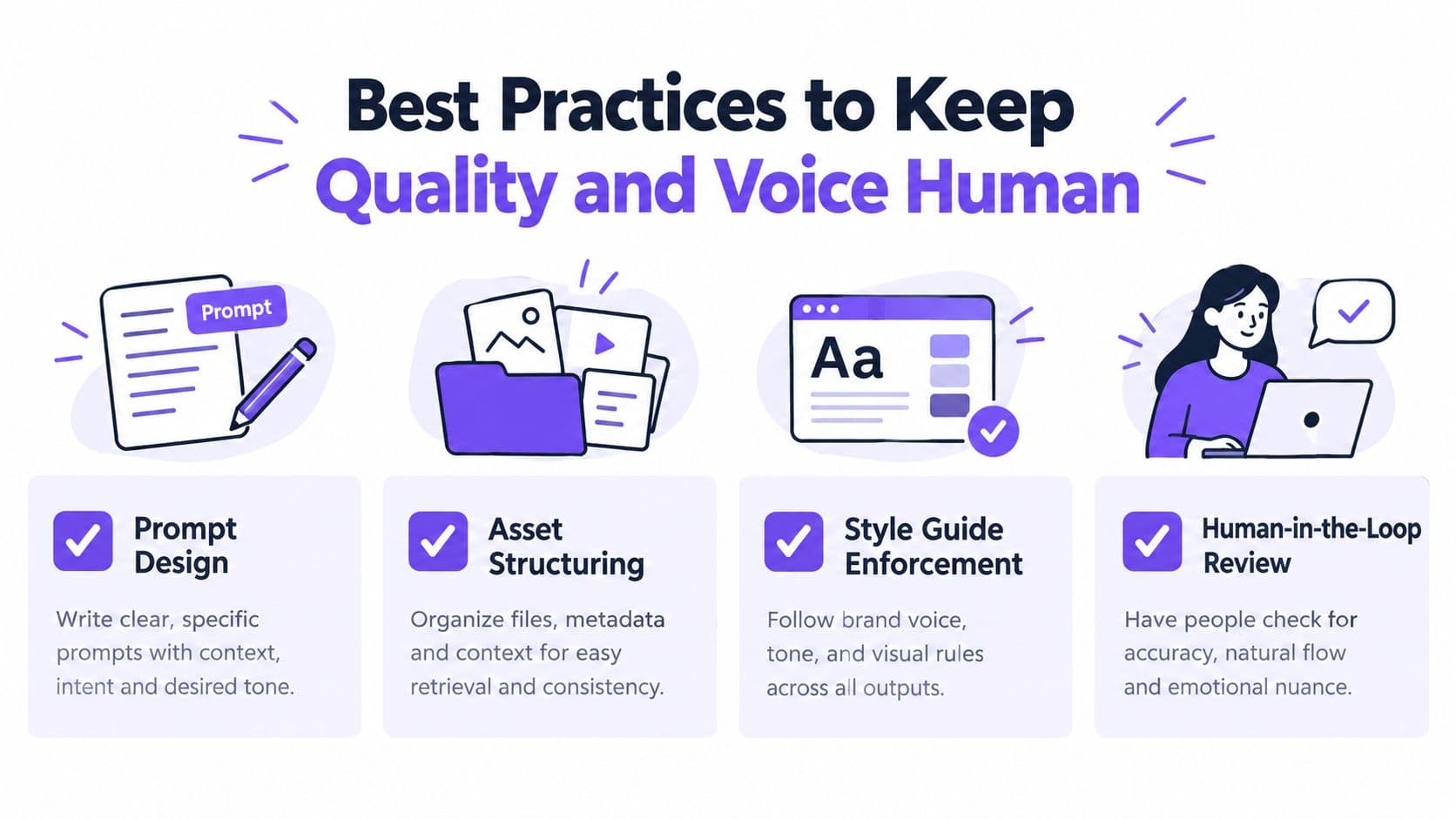
Build a voice operating system
Many organizations say they want “consistent brand voice,” but they only have a loose feeling of what that means. Write it down.
Include:
- What you sound like: direct, playful, skeptical, educational, punchy, calm
- What you avoid: hype words, jargon, filler intros, overexplaining
- What your openings do: lead with tension, problem, payoff, or surprising contrast
- What your endings do: drive comment, click, save, or purchase intent
If you want another practical perspective on designing repeatable systems, the RedactAI content scaling guide is worth reading because it focuses on process discipline, not just generation.
Use prompts that act like briefs
A weak prompt asks for a video about a topic.
A strong prompt gives:
- audience
- platform
- tone
- desired emotional effect
- source facts
- banned claims
- formatting constraints
- examples of good openings
That turns generation into production instead of guessing.
Practical rule: Prompt for options, not a final answer. Ask for three hooks, two structures, and one counterintuitive angle. Then choose.
Review the parts viewers feel first
Viewers don't audit your workflow. They react to delivery.
Check these manually before posting:
- Voiceovers: Listen for pacing, stress, and whether key words sound natural.
- Visual rhythm: Make sure scene changes support the point instead of distracting from it.
- Emotional tone: If the subject needs urgency, empathy, or humor, the delivery has to carry it.
The human standard isn't perfection. It's believability.
Real World Examples of Automated Social Video at Scale
The easiest way to understand automated content creation is to look at what gets automated in short-form video. Not theory. Production tasks.
Faceless channels and format reuse
A faceless channel operator might start with one niche idea, such as productivity lessons, product explainers, finance commentary, or storytelling clips. Manually, they'd research topics, script each video from scratch, hunt for footage, edit captions, add voiceover, and export platform versions one by one.
An automated setup changes the sequence. The operator tracks recurring formats, saves a prompt structure for each, batches script generation, assembles scenes from reusable visual patterns, and localizes versions when needed. The time savings don't only come from editing less. They come from making fewer decisions from zero.
If your raw material starts with long-form content, guides on the best tools for clipping long videos can help connect repurposing with a short-form pipeline.
UGC ads, slideshows, and multilingual variants
Social ads are a good example because they need variation. One product may need problem-aware hooks, testimonial-style framing, before-and-after storytelling, and offer-led cuts for different audiences.
That's where a tool like Hooked fits as one option in the stack. It combines trend tracking, script generation, video assembly, voiceovers in 29 languages, avatars, lip sync, and scheduling across major social platforms. In practice, that means a team can build faceless videos, AI Shorts, UGC-style ads, or TikTok slideshows from a repeatable workflow instead of rebuilding each asset manually. For channels exploring this model, YouTube automation workflows for faceless channels show the kind of operating setup many creators are moving toward.
What good operators keep manual
This is the part people often skip. The channels that hold attention usually keep a few decisions human:
- Angle choice: Which pain point gets the frame.
- Opening line selection: Which hook sounds native to the niche.
- Final output selection: Which of several generated versions feels sharp.
- Authenticity check: Whether the voice, visuals, and pacing feel too synthetic.
The highest leverage use of automation in social video isn't posting more. It's narrowing faster toward ideas worth posting.
That's why some automated videos still flop. The editing got easier, but the judgment never improved. Scale only helps after the idea quality improves.
Choosing Your Next Move with Automated Content Creation
You don't need a fully automated media machine to benefit from this category. Many teams should start smaller.
When to automate a lot
Heavy automation makes sense when your content has repeatable structure. Product promos, list formats, reaction templates, educational shorts, multilingual versions, and recurring ad concepts all fit well because the workflow repeats even when the details change.
It also makes sense when your bottleneck is execution. If you already know your audience, know your offers, and know which hooks tend to work, automation can remove a lot of production drag.
When to automate only a little
Use lighter automation when the content depends on a strong personal voice, nuanced expertise, or trust-heavy storytelling. Founder videos, high-stakes thought leadership, sensitive topics, and customer proof often need more human shaping.
A partial system usually works better there:
- brainstorming support
- research assistance
- rough script generation
- repurposing after the main piece is finished
Three moves to make this week
Start with a pilot, not a rebuild.
- Pick one repeatable formatChoose one content type you already make often. Maybe a product explainer, faceless short, or UGC-style ad. Document the structure before you automate it.
- Calibrate your voiceBuild a short style guide with real examples. Include phrases you use, phrases you hate, pacing notes, and what a good hook sounds like in your niche.
- Add one review loopAfter publishing, review not just output quantity but output quality. Which hooks earned attention, which versions felt stiff, which voiceovers sounded forced, and which edits felt natural.
The goal isn't to become “AI-first.” The goal is to become system-first. When your system is strong, tools help. When your system is weak, tools just make the mess faster.
The creators and brands that win with automated content creation usually do one thing better than everyone else. They know exactly where the machine should help and exactly where a human should step in.
If you want a practical way to apply this, Hooked helps creators and brands turn trends, scripts, products, and ideas into social videos with built-in workflow support for scripting, editing, voiceovers, scheduling, and analysis. It's designed for the kind of repeatable short-form system this article described, especially if you're scaling faceless channels, ads, or multilingual social content.